Denon DJ Prime 4 G2: onboard stems, MPCe pads and built-in DMX
· DJing
Denon's Prime 4 G2 lands at 2,599 dollars with Stems rendered on the unit, multi-zone MPCe pads, a DMX socket for your lights, and OmniSource still to come.
Denon DJ has replaced the Prime 4, and this time it is not a refresh. The Prime 4 G2 is out on 1 September 2026 at 2,599 dollars, 2,699.99 euros or 2,299.99 pounds, and it does things no other four-channel standalone does. Performance pads borrowed from the MPC that read pressure and position. Stems the unit renders by itself, with no laptop anywhere. A DMX socket on the back that drives your lights directly.
The original Prime 4 arrived in 2019 and more or less invented the four-deck standalone category, two years before AlphaTheta had an answer to it. The Prime 4+ in 2023 was a tune-up rather than a sequel. Seven years on, this is the real follow-up, and it shows.
What is actually new
- Sixteen multi-zone MPCe pads that read velocity, pressure and finger position, so one pad can trigger several things depending on where and how hard you hit it.
- Stems rendered on the unit itself. The Prime 4+ could play stems, but only if you rendered them on a computer first.
- A 3-pin DMX output built into the chassis, with Engine Lighting and SoundSwitch running on board.
- Full-size 8-inch jog wheels with 60 LEDs each and a centre display, up from the 6-inch wheels on the Prime 4 and Prime 4+.
- Two effects paddles with savable favourite slots, replacing the old button-and-knob effects strip.
- An eight-core ARM processor with 4 GB of RAM, which Denon says is four times the processing power of the last generation.
- An ESS ES9017S 32-bit DAC, the best converter Denon has put in a Prime unit.
- OmniSource, which turns laptop software into just another input you can switch to mid-set. This one is not ready yet, and it matters. More on that below.
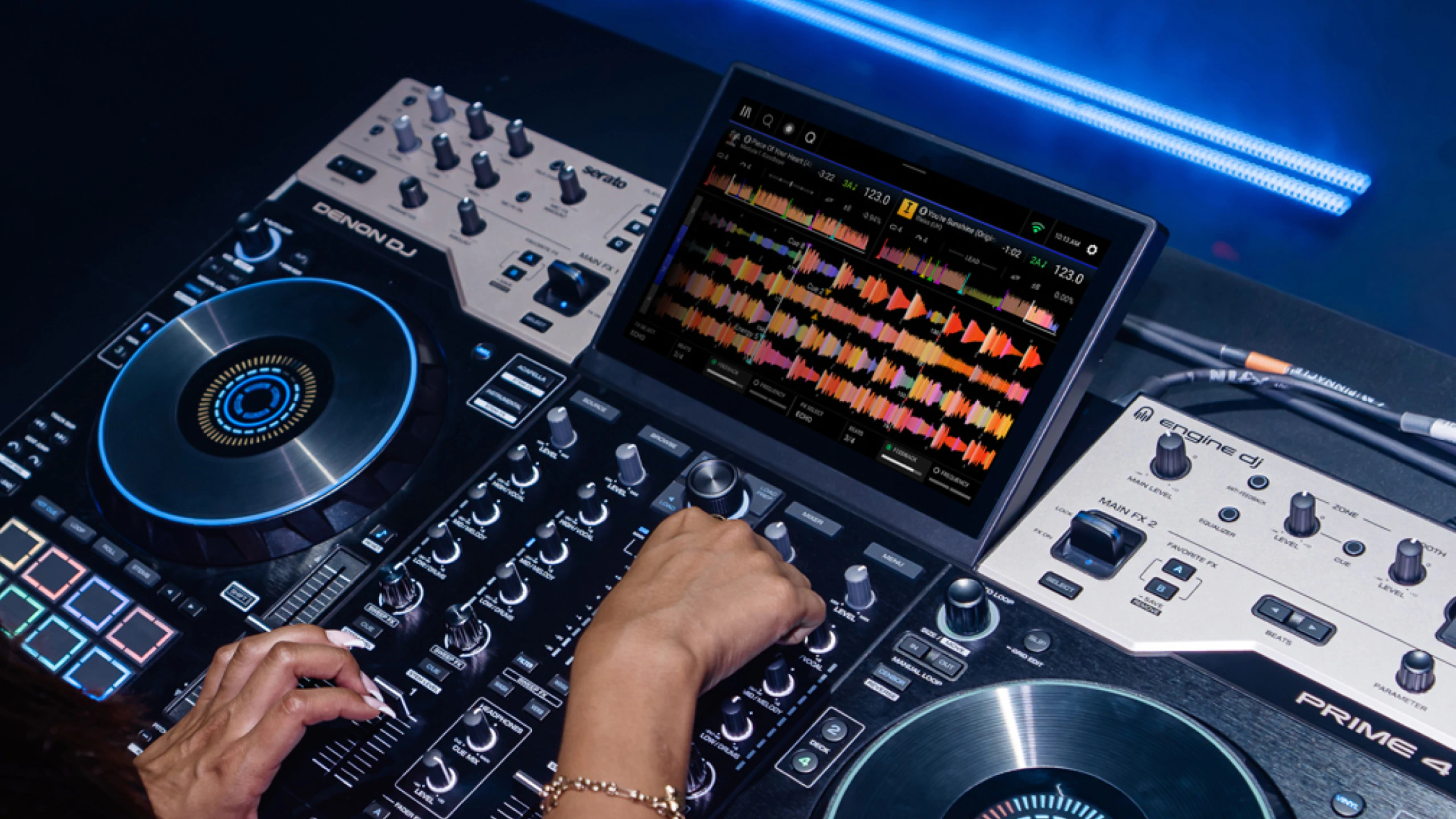
The MPCe pads are the headline, and they earn it
Denon calls these an industry first, and for once the marketing holds up. The pads come from the current generation of Akai MPC hardware, which InMusic also owns, and they sense velocity, pressure and where your finger sits on the pad surface. In practice that means a single pad can carry two or four separate functions at once, and the screen shows you how each pad is currently divided.
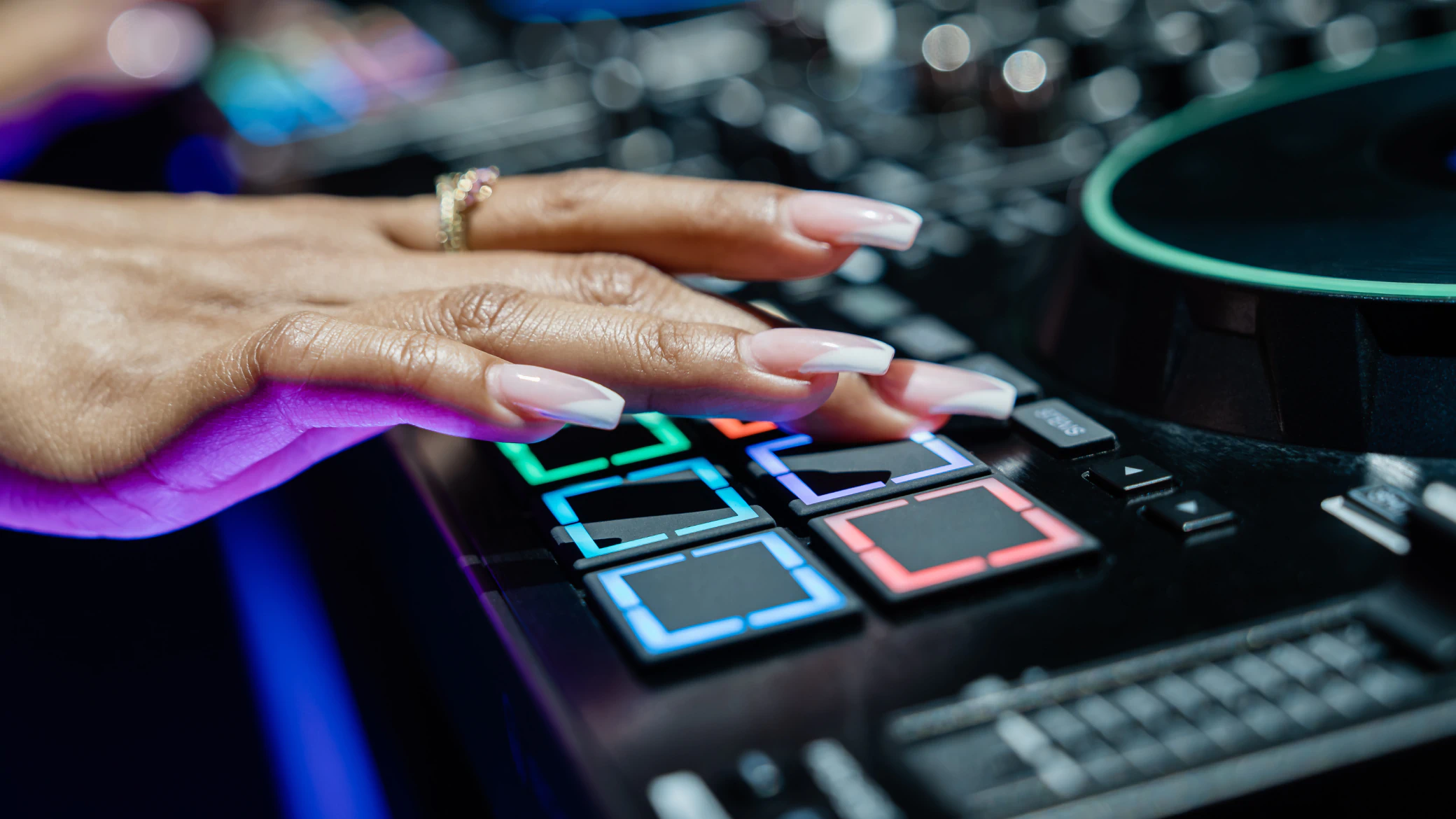
The familiar modes are all still there: hot cue, saved loop, auto loop, loop roll, slicer, slicer loop, sampler and stems. Double-tap a mode button or hold shift and you get into the new material.
- Hot cue roll splits each pad into four corners, and each corner rolls its hot cue at a different length. Jump to a cue and stutter it in one press.
- Hot cue stems splits the pad down the middle. Left half jumps to the cue as an acapella, right half jumps to it as an instrumental. This is the mode Beatport Tech picked out as the one with real mixing value, because you start a phrase and strip it in the same movement.
- Auto loop stems does the same thing, but looping. One side loops the vocal, the other loops the instrumental.
- Filter roll lets you slide a finger around the pad so the roll length and the filter move together.
- Roll effects puts key shift on the top pads while they roll. The bottom four give you a vinyl break, a reverb rise, a recycler and an echo out, each with a longer and a shorter version depending on which side you press.
- XY effects turns each pad into a small XY panel: filter echo, LFO filter, high and low pass, flanger, filter gate, echo, phaser and noise gate, all played by dragging across the surface. A white light tracks your finger.
They are not perfect. There is a knack to hitting the zones, and the early hands-on reviews split on them: Beatport Tech called them the most exciting thing on the unit, while Digital DJ Tips found them gimmicky and pointed out you can simply turn the extra modes off. Both are fair, and I suspect the answer only shows up after a few months of gigs. Hot cue stems and the lighting modes are the two I would bet on sticking. The rest may end up as party tricks.
Stems, rendered on the unit
This is the feature that closes the loop Denon opened in 2023. The Prime 4+ was the first standalone that could play separated stems, but you had to render them on a computer in Engine DJ and export the result. The G2 does the whole job itself, using the same rendering engine that appeared on the Rane System One earlier this year.
Swipe left on a track in the browser, hit Stem, and the unit gets to work. It is not instant. Beatport Tech timed a 3 minute 47 track at 3 minutes 32 to render, so budget roughly the length of the song. You can keep playing that track while it processes, you just cannot touch its stems until it finishes, and once it is done the result is saved for good. The sensible workflow is to queue a playlist and let it grind through overnight rather than reaching for a stem you have not prepared.
Once a track is rendered you get four stems, vocal, melody, bass and drums, and four ways to play them: the dedicated acapella and instrumental buttons on each deck, the stems pad mode with an echo-out under each stem, the channel EQ knobs switched over to stem levels with shift and cue, and the pad modes that combine stems with cues and loops. Hold shift with acapella or instrumental and the other half echoes out instead of cutting.
On quality, be realistic. The drums come out crisp and the acapellas are clean enough for a club, but there is audible vocal bleed into the melody stem and the separation is still behind the best desktop software. It is usable in a mix rather than transparent. The point is that nothing else in this category offers stems standalone at all.
A DMX socket on the back, and lights on the pads
For mobile and wedding DJs this may be the most practical change on the whole unit. Engine Lighting is SoundSwitch under the hood, and it has been on Engine hardware for a while, but it always needed something else in the chain to speak DMX. The G2 has an isolated DMX interface built in with a 3-pin output, one universe and 512 channels. Plug a DMX cable or a wireless transmitter straight into the back and you are running lights. The port supplies power too, so a wireless transmitter needs nothing else.
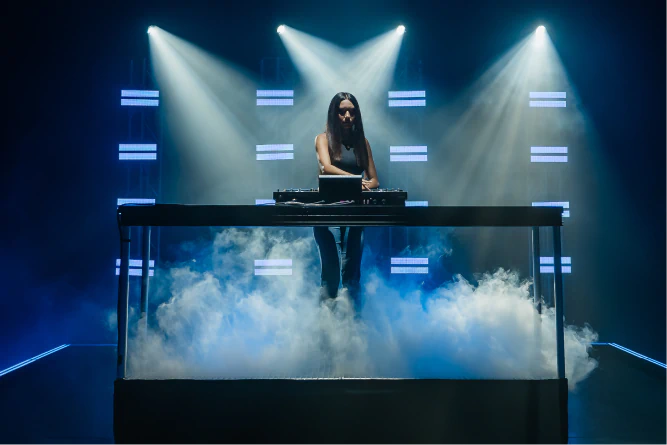
If one universe is not enough, adding a SoundSwitch DMX Micro or a Control One takes you to two universes and 1,024 channels, and you can mirror one universe across both outputs. On the smart bulb side there is Philips Hue and Nanoleaf support.
The clever part is what the pads do with it. Hold shift and press stems and the whole pad grid becomes a lighting surface: strobe, smoke, white flash, blackout, UV and auto-loop play or pause, plus colour override with each corner of a pad holding a different colour, eight position overrides, auto-loop bank selection, and static looks that show up colour-coded to match how you set them in SoundSwitch. With the quadrants you can reach 32 auto loops from eight pads.
There is one trick worth stealing. This is a four-deck unit, so if you only play on two decks, park the lighting pad mode on deck three or four. Now switching to lights is a single deck button rather than a menu dive, and your two playing decks keep their hot cues. If you use two decks, you can even keep two separate banks of lighting control on the spare pair.
One limit: the auto loops and static looks themselves still have to be built in SoundSwitch on a computer and exported. The G2 plays and overrides them, it does not author them.
Bigger jog wheels, and what the centre display tells you
The 8-inch wheels are the change you notice first. The Prime 4 and Prime 4+ used 6-inch jogs with a 5-inch top surface, which was the most common complaint about both. These have a 7-inch top plate and a much better feel for spinbacks and cutting, though they are still capacitive and static, with no motor and no tension adjustment. Beatport Tech rates them the best static wheels Denon has made.
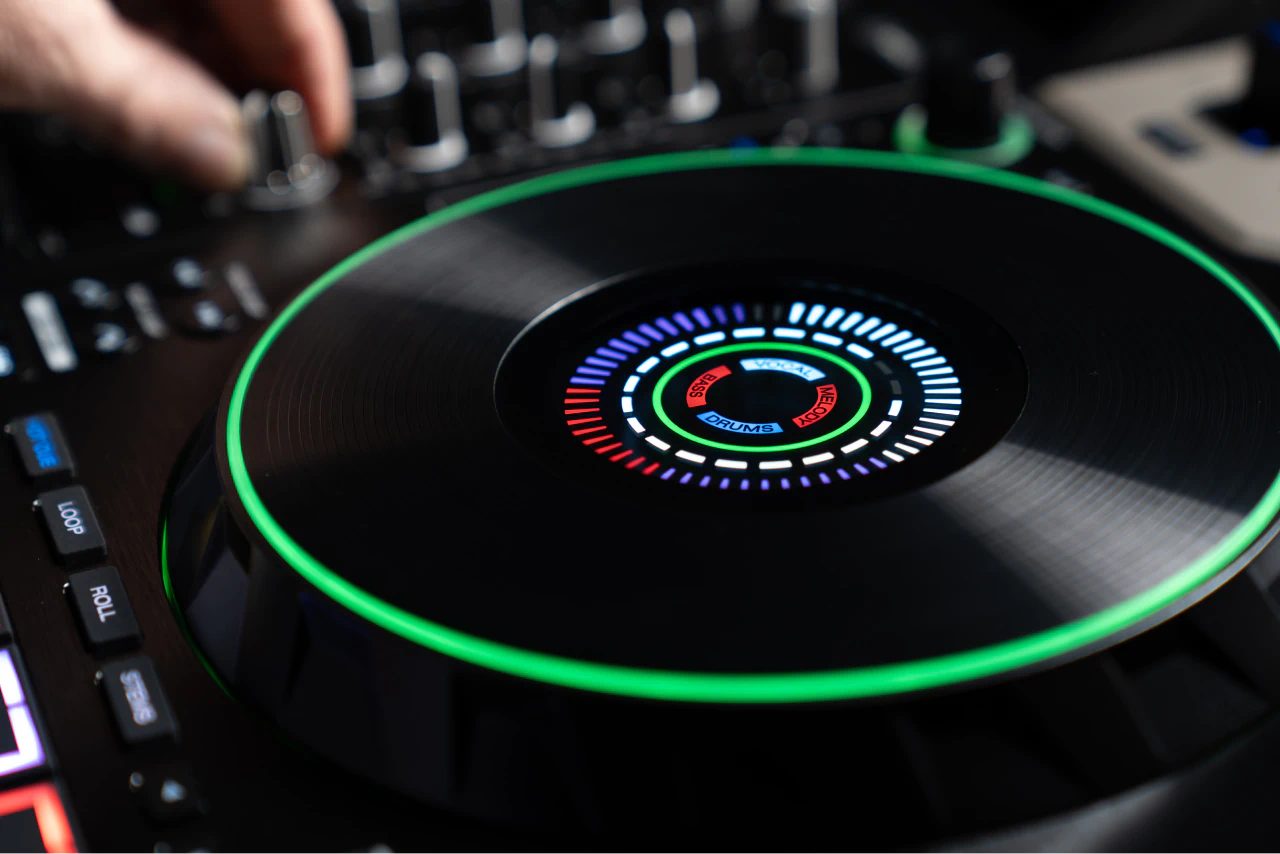
There is no album art in the centre, which some people will miss, but what replaces it is more useful mid-set. The outer ring is your playhead. The inner ring is how much track is left. The stem indicators show which of the four stems are live even when you are not in stems mode. And the coloured bar counts you down to the next hot cue and shows the one you just passed, colour-matched to the cue itself. If you mix on cue points rather than by ear, that alone changes how you work.
Effects: two paddles and a lot of ways in
The old effects strip with its little screens is gone, replaced by two paddle switches at the top of the unit. Pull towards you for momentary, flick away to lock. Anyone who has used a battle mixer in the last few years will know the feel instantly, and it is far quicker than the layout it replaces.
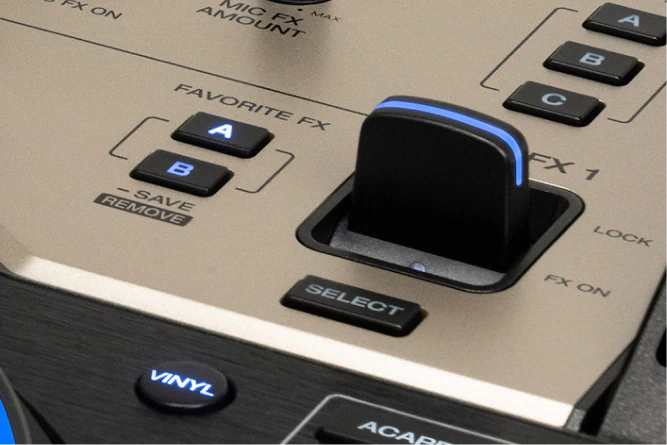
Under each paddle is a Select button that opens the full effects list on screen, with beats, parameter and amount controls beside it. Hold the A or B favourite button and whatever you have selected is saved there for instant recall, which matters if you are the kind of DJ who uses two effects all night and never touches the rest.
And that is before the other four layers:
- Sweep FX on every channel: filter, noise, wash and reverb, with the filter adjustable from bleed to kill.
- Fader FX with A and B slots holding fader echo, echo down, subverb and reverb down, triggered by the channel fader, the crossfader or both.
- Touch FX on the touchscreen, assignable to a channel or the master, and usable alongside the paddles.
- Stem FX for the separated parts, and Mic FX with a choice of echo or reverb.
Each channel routes to FX1 or FX2 in the mixer menu, not to both at once. Given how many other effect layers are running, that is not much of a limit.
The output stage is the real mobile DJ argument
Nothing else in this price bracket has a back panel like this. Three pairs of balanced XLR outputs, main, booth and zone, with an unbalanced RCA pair for the main as well. Each of the three has its own level control and, more importantly, its own 10-band EQ that you dial in from the mixer screen. Most DJs only get that by carrying a separate mixer.
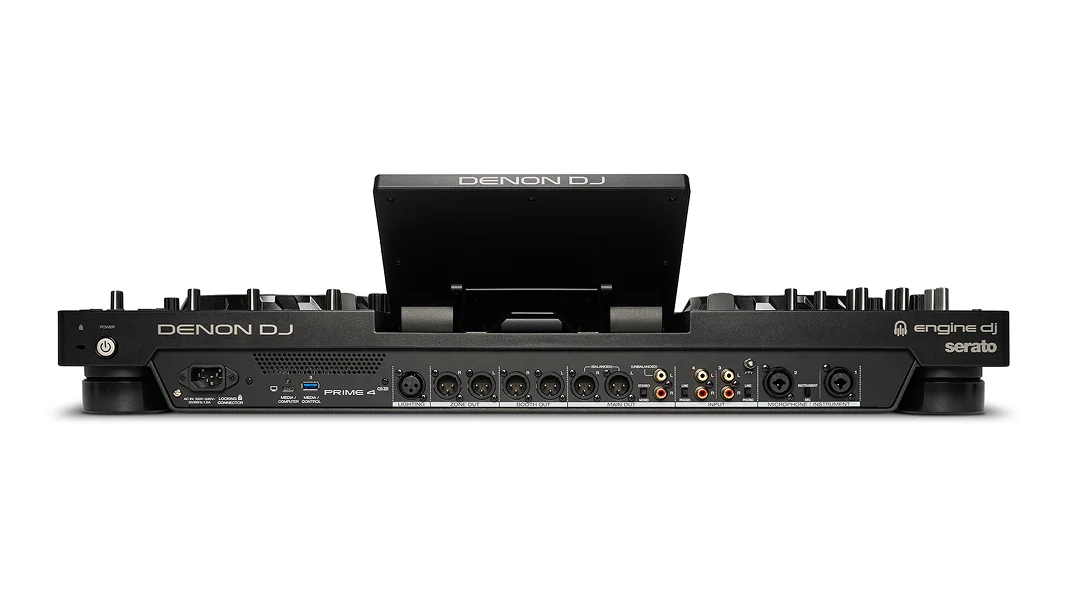
The zone output is the one wedding DJs will care about. You can cue it in your headphones, feed it from any single channel or from the main mix, and run a completely different playlist into a different room. Cocktail hour in the bar while the dance floor gets something else, from one box.
The rest of the connections:
- Two microphone inputs on XLR and quarter-inch combo jacks, each with its own gain, two-band EQ and on/off switch, plus talkover, anti-feedback and echo or reverb. Mic 2 switches to instrument level for a guitar or a synth.
- Channels 3 and 4 take RCA line or phono inputs with proper RIAA equalisation, so turntables plug straight in.
- Media everywhere: an SD card slot, USB-C and USB-A on the top panel, another USB-A and a locking USB-C round the back, and a bay underneath for a bare 2.5-inch SATA drive.
- Wi-Fi 5 on both bands and Bluetooth 5.4, with Bluetooth assignable to any channel as an input.
- A locking IEC socket on an internal power supply, drawing 100 W.
The numbers back it up: 119 dB of dynamic range on the balanced XLR mains, +20 dBu maximum output and THD+N of 0.001 percent, all fed by that ESS ES9017S converter.
One genuine loss, though. The Ethernet port is gone. The Prime 4+ had one. Everything network-related on the G2 now goes over Wi-Fi, Digital DJ Tips called that a mistake, and on a unit this dependent on streaming it is hard to argue. In a venue with flaky wireless it will hurt.
Streaming, and the one service missing
Amazon Music Unlimited, Apple Music, Beatport, SoundCloud Go+ and TIDAL are all supported on board. Spotify is not on the list. Beyond streaming the unit reads AAC, AIFF, ALAC, FLAC, MP3, MP4, Ogg Vorbis and WAV up to 192 kHz and 32-bit, from exFAT or FAT32 media.
OmniSource: the upgrade that has not landed yet
OmniSource is the idea that a laptop stops being a mode you boot into and becomes just another source, selectable per channel alongside your SD card, your internal drive, Bluetooth and a line input. On the old Prime 4 you effectively had to restart the unit to move between standalone and Serato, which made hybrid sets impractical. On the G2 you would just switch the channel.
The catch is right there on Denon's own product page: OmniSource software support coming soon. Serato DJ Pro, Algoriddim djay and VirtualDJ are the three named. Traktor is not, even though InMusic now owns it.
Be clear about what that means. If you already own a Prime 4 or a Prime 4+, OmniSource is probably the single most compelling reason to upgrade, and it is the one thing you cannot test on launch day. The Serato logo is printed on the chassis. The software to use it is not out. Anyone buying specifically for hybrid mixing should wait for the release notes rather than the press release.
How it compares
Against the Prime 4+
This is the close call, and it depends entirely on how you play. The Prime 4+ is still on sale and street prices have been running several hundred dollars under the G2. It already gives you four decks, the same 10.1-inch screen, streaming and Engine Lighting. What you are paying extra for is onboard stem rendering, the MPCe pads, the bigger jogs, the new effects workflow and OmniSource when it arrives. If you play prepared sets from your own library and rarely use the pads beyond hot cues, the Prime 4+ is the better value. If stems and lighting are part of your show, the G2 is a different machine.
Against the original Prime 4
No contest. Seven years of Engine DJ development, real stems, four times the processing power, much better jogs, a completely reworked effects section. If you are still on a 2019 Prime 4, this is the generational jump you have been waiting for. Our earlier look at the Prime 4+ covers where the line was before this.
Against the AlphaTheta XDJ-AZ
The XDJ-AZ starts around 3,099 dollars, roughly 500 more, and it buys you something the Denon cannot: club muscle memory. Its layout mirrors CDJ-3000s and a DJM-A9, so what you learn transfers straight to the booth you will find in 99 percent of venues. What it will not do is run stems standalone, and it gives you a three-band EQ on the outputs where the G2 gives you ten. It is also heavier and wider. Pick the AZ if your path runs through clubs, and the G2 if it runs through weddings, bars and private events. Same question we raised with the XDJ-AN and the CDJ-3000X: ecosystem, or features.
Against the SC Live 4 and the Rane System One
The SC Live 4 is still around at roughly 1,150 to 1,275 dollars and remains the affordable four-channel Denon, but it has none of the G2's premium feel, its output stage or its pads. The Rane System One, from Denon's sister company under the same parent, sits in similar money to the G2 with the same processing generation and the same on-device stem rendering, but it is an all-metal two-deck unit with spinning platters and no external inputs. Two decks and motorised platters, or four decks and every socket you could want. That is the whole choice.
The good
- Stems rendered on the unit, with no computer anywhere in the workflow. Nothing else in the category does this.
- MPCe pads that genuinely open up new moves, especially hot cue stems and the lighting grid.
- A DMX output built in, with SoundSwitch on board. For a mobile DJ that replaces a separate lighting controller and the box it lives in.
- An output stage with no rival at the price: three balanced XLR pairs, each with its own level and its own 10-band EQ, plus a cueable zone you can feed independently.
- Two proper microphone inputs with EQ, talkover, anti-feedback and effects, and an instrument switch on mic 2.
- Much better jog wheels, and a centre display that tells you something useful.
- Storage options for the paranoid: SD, four USB ports and an internal SATA bay.
- Lighter and narrower than the XDJ-AZ at 9.9 kg and 76.2 cm wide, which matters if you load in alone.
The catches
- OmniSource is not shipping yet, and it is the main reason an existing Prime 4 or 4+ owner would upgrade. No Serato, djay or VirtualDJ support at launch.
- No Ethernet port at all, a step back from the Prime 4+, on a unit built around streaming.
- Stem quality is usable rather than excellent, with noticeable bleed between vocal and melody, and rendering takes about as long as the track.
- No Spotify, and Traktor is not among the named OmniSource platforms.
- It is big. 76.2 by 49.7 cm and about an inch and a half wider than the old Prime 4, so an existing flight case with a cutout probably will not fit.
- Several physical controls, including the channel input selectors, crossfader assign and effects assign, have moved to the touchscreen.
- The pads have a learning curve, and some zone layouts are not obvious at first.
- Capacitive static platters. If you want a motorised wheel, this is not it.
Who it is for
The G2's natural home is a mobile or private event rig, and everything about it says so: XLR on every output, a zone out with its own cue, two mic channels, lighting control in the box. If you play weddings, corporate parties and bars, this is the most complete single unit anyone currently makes.
It also suits serious hobbyists and home DJs who want the most features per pound, as long as you are comfortable living outside the rekordbox ecosystem. And if you are coming from an original Prime 4, the upgrade case makes itself.
Look elsewhere if club muscle memory is the thing you cannot compromise on, or if you have to get your rig up a flight of stairs in one trip. And if hybrid laptop mixing is the whole reason you are buying, that one is a wait rather than a no.
Specs at a glance
- Price: 2,599 dollars, 2,699.99 euros, 2,299.99 pounds. Available 1 September 2026.
- Decks and channels: four decks, four-channel mixer.
- Processor: eight-core ARM, 4 GB RAM.
- Screen: 10.1-inch, 1280 by 800, optically bonded multi-touch, five fixed angles plus flat.
- Jog wheels: 8-inch capacitive, 60 LEDs each, centre display.
- Pads: 16 multi-zone MPCe, velocity and pressure sensitive with 3D sensing.
- DAC: ESS ES9017S 32-bit. Main XLR out: 119 dB dynamic range, +20 dBu, THD+N 0.001 percent.
- Outputs: main XLR and RCA, booth XLR, zone XLR, quarter-inch and 3.5 mm headphones.
- Inputs: two XLR/quarter-inch mic combos (mic 2 switchable to instrument), two RCA line/phono pairs.
- Lighting: 3-pin DMX out, one universe and 512 channels, expandable to two universes with a SoundSwitch interface. Philips Hue and Nanoleaf.
- Storage: SD/SDHC/SDXC, two USB-A, two USB-C, internal SATA 3.0 bay.
- Wireless: Wi-Fi 5 dual band, Bluetooth 5.4. No Ethernet.
- Streaming: Amazon Music Unlimited, Apple Music, Beatport, SoundCloud Go+, TIDAL.
- Power: 100 to 240 V, 100 W, locking IEC.
- Size and weight: 76.2 by 49.71 by 10.49 cm, 9.9 kg.
Denon's own videos
Frequently asked questions
How much does the Denon DJ Prime 4 G2 cost?
2,599 dollars in the US, 2,699.99 euros in Europe and 2,299.99 pounds in the UK, available from 1 September 2026.
Can the Prime 4 G2 separate stems without a laptop?
Yes. It renders stems on the unit itself and saves the result. Rendering takes roughly the length of the track, so prepare your playlist in advance rather than mid-set. The Prime 4+ could only play stems that were rendered on a computer first.
Is the Prime 4 G2 worth upgrading to from a Prime 4+?
Only if you use pads, stems or lighting. The Prime 4+ already covers four decks, the screen, streaming and Engine Lighting. The G2 adds onboard rendering, MPCe pads, 8-inch jogs, the paddle effects and eventually OmniSource. From an original 2019 Prime 4, the upgrade is much easier to justify.
Does the Prime 4 G2 work with Serato and VirtualDJ?
It is designed to, through OmniSource, with Serato DJ Pro, Algoriddim djay and VirtualDJ named by Denon. That support is listed as coming soon and is not available at launch. Traktor has not been announced.
Can it control lights without extra hardware?
Yes. Engine Lighting and SoundSwitch run on board and the 3-pin DMX output drives fixtures directly, one universe and 512 channels. You still need to build your auto loops and static looks in SoundSwitch on a computer and export them. Adding a SoundSwitch DMX Micro or Control One doubles you to two universes.
Does the Prime 4 G2 have an Ethernet port?
No. The Prime 4+ had one, the G2 does not. All networking runs over Wi-Fi 5.
Will my Prime 4 flight case fit it?
Probably not. The G2 is about an inch and a half wider and slightly deeper than the Prime 4, so a case with a moulded cutout will need replacing. Most booths that took a Prime 4 will still take a G2.
The verdict
Denon has thrown everything it has at this one. On features per pound there is nothing close to it in the four-channel standalone market right now, and for a mobile DJ carrying lights, mics and a zone feed, it quietly replaces two or three other boxes. The pads are the fun, but the output stage and the DMX socket are what will actually get it bought.
Two caveats keep it from being a straight recommendation. OmniSource, the feature most likely to move existing Prime 4 owners, is not here yet. And dropping Ethernet from a streaming-first flagship remains a puzzle. Neither is a reason to avoid it, but both are worth knowing before you order.
Full specifications are on the official Denon DJ Prime 4 G2 page.
The hands-on reviews
Two of these are the reviews quoted above: Beatport Tech on the pads and the stem render times, and Digital DJ Tips on the missing Ethernet port. The other two are worth the time if you want a mobile DJ's angle on the lighting.
One last thought. Four decks, lights and a separate zone feed out of a single box with no laptop is the same instinct behind remote and streamed sets: carry less, set up faster, spend the saved hour on the music. If that is how you play, our lossless streaming setup is worth a look, and the DJing DJ Pool will keep the drive in the back of your G2 full.