Serato DJ for iOS: the full Serato on iPhone and iPad, plus Serato DJ 5.0
· DJing
Serato DJ is now on iPhone and iPad, free to start or 149 dollars once, with iOS Transfer, DVS and 120+ controllers. What works, what is missing, and how it compares to djay and Serato's old Pyro app.
Serato has finally done it. On 20 October 2026 the company released Serato DJ for iOS, a full version of its DJ software for iPhone and iPad, on the same day Serato DJ Pro and Lite 5.0 came out of beta on the desktop. The app is free to download, a full licence is a one-off 149 dollars, and if you already pay for Serato DJ Suite you get it at no extra cost.
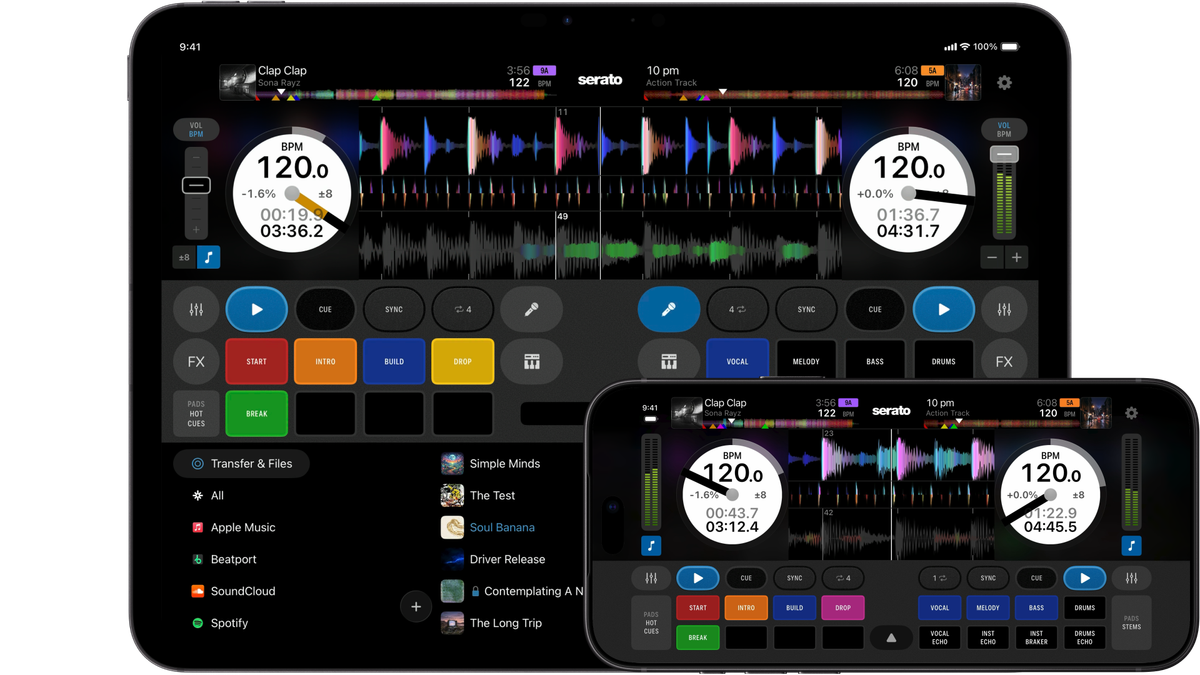
And it is the real thing. You get the decks, the stems, the pad modes, cue loops, the new Lucid Beatgrids, recording and full DVS with turntables, and it plugs into more than 120 controllers and mixers on day one. Beatport Tech had seen an early build at NAMM in January and still did not know it would be part of 5.0. Their review of the beta had said 5.0 did not feel big enough to earn a new version number. With this app, it does.
There are real limits, mostly in the library, and they matter more than the spec sheet suggests. We went through Serato's own material and the best of the launch-week reviews to find them.
Serato on iOS before this: Pyro, and not much else
Serato has been on the iPhone before, just never as a DJ tool. Its previous mobile app was Serato Pyro, which came out first in New Zealand and then worldwide in February 2016. Pyro was aimed squarely at people who are not DJs. You gave it a playlist from your iPhone library or your Spotify Premium account, and it reordered the songs and mixed them into each other automatically, nudging the tempo so the transitions sounded smooth. It had a Mix Up shuffle, a recommendation engine that kept the party going when the playlist ran out, and even an Apple Watch app.
What it never had was decks. No cue points, no EQ, no pads, nothing a DJ would actually touch. Reviews at the time were split on how well the automatic mixing worked. Serato stopped supporting Pyro on 7 May 2020 and pulled it from the App Store, and Spotify ended its integration with third-party DJ apps a few weeks later, on 1 July 2020, so even installed copies lost their biggest music source.
The only other thing Serato had on iOS was Serato Remote, an iPad app that controlled the laptop software rather than replacing it. So for most of the last decade, if you wanted to DJ properly on an iPhone or iPad, you used Algoriddim djay or Pioneer DJ's rekordbox app. Serato DJ for iOS is the company's answer to both, and the contrast with Pyro could hardly be bigger. Pyro tried to remove the DJ from the process. This app is the DJ software itself.
What is actually new
- A new app called simply Serato DJ, for iPhone and iPad, running iOS or iPadOS 18.6 and later. There is no Android version.
- Close to the full Serato DJ Pro feature set in the paid version: stems with Stems FX, eight hot cues, cue loops, the sampler, slicer, beat jump, pitch play, key sync and key shift, recording and DVS.
- Plug-and-play support for more than 120 controllers, mixers and turntable setups from AlphaTheta, Pioneer DJ, Rane, Numark, Hercules, Roland, Denon DJ, Reloop and others.
- iOS Transfer, a new panel in Serato DJ Pro and Lite 5.0 on the desktop that sends crates to your phone or tablet over Wi-Fi, AirDrop or a cable, with cue points, loops and beatgrids intact.
- Streaming from Apple Music, Beatport, SoundCloud, Spotify and TIDAL.
- A free tier that works on its own and with entry-level controllers, a 149 dollar one-off licence, and inclusion in Serato DJ Suite at 14.99 dollars a month.
Getting your music onto it is the best part
Every mobile DJ app lives or dies on this question, and it is the one Serato has answered best. Open Serato DJ Pro or Lite 5.0 on your computer and a new iOS Transfer section appears in the sidebar. On the phone, tap Transfer and Files, then Transfer, and the device shows up on the laptop. From there you drag a crate or a handful of tracks onto it, or right-click a crate and choose Transfer to iPhone. Accept on the phone and the files arrive with their cue points, saved loops, beatgrids and track information.
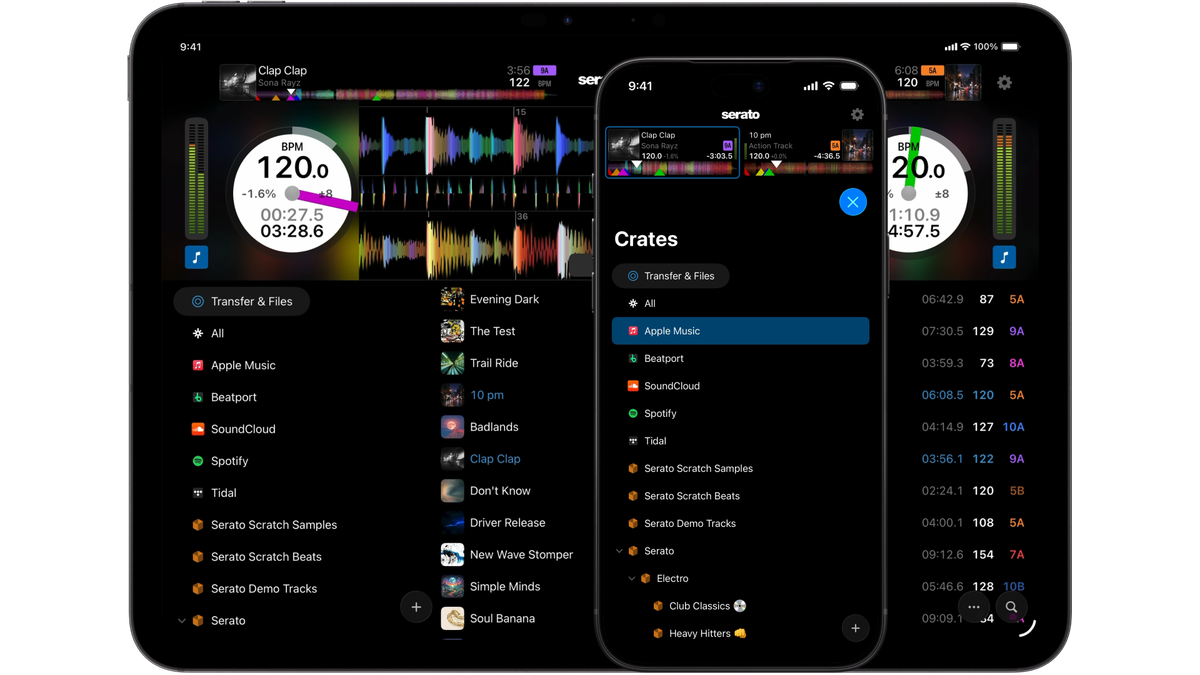
It works over Wi-Fi when both devices share a network, over AirDrop, or over a USB cable, which is the quickest. Cleveland Terry sent a seven-track crate wirelessly in about a minute. Crossfader moved a 92-file crate the same way. Beatport Tech, who has spent years complaining about getting music into djay, said it boggles the mind that Algoriddim never built something like it.
There are a few things to know before you rely on it:
- It only goes one way. Cue points or beatgrid edits you make on the phone stay on the phone. There is no way to send them back to the laptop and no cloud sync.
- Smart crates do not transfer, and if a crate mixes streaming tracks with local files, only the local files come across.
- Every transfer lands in a new dated folder on the phone, so expect some tidying up.
- Serato stores cues and grids inside the audio files. If you have just edited a track on the laptop, the change may not travel until Serato has written it to the file. Cleveland Terry found that closing and reopening Serato on the computer fixed it.
You are not tied to a laptop either. The Files option imports tracks or whole folders from iCloud Drive, Dropbox, Google Drive or a USB drive plugged into the phone, and because Serato's data lives in the files, any track already prepared in Serato keeps its cues. Your crates on that drive will not come with it, though. And if you have nothing at all, the app ships with a small free music library so you can start mixing straight away.
Mixing on the glass
On the phone or tablet alone, the layout will look familiar to any Serato user: virtual decks on each side, waveforms across the top, the crossfader in the middle, transport and pads underneath and the library at the bottom. On an iPhone you can play in portrait or landscape, and you can switch between horizontal, vertical and extended waveform views. Beatport Tech ended up using a different view on the iPhone and on the iPad because the screen shapes suit different layouts.
A few details show real thought. Long-press the auto loop button to change its length. The level meter sits inside the volume slider. Tap above it and the same space becomes your pitch slider, with ranges from 8 to 50 percent and a key lock toggle next to it. The EQ panel, with full-kill EQs and a channel filter that can switch to dub echo, reverb or noise, stays open while you work elsewhere, and so does the effects panel, which gives you three stackable effects per deck. Double-tap almost any knob or slider and it resets, which on a touchscreen is a lifesaver.
The pad modes are the ones you know from the desktop: hot cues you can rename and recolour, stems, sampler, auto loop, loop roll, beat jump, pad effects, slicer, slice loop and saved loops. On stems you get the four parts, vocal, melody, bass and drums, plus echo-out pads for vocal, instrumental and drums and an instrumental breaker.
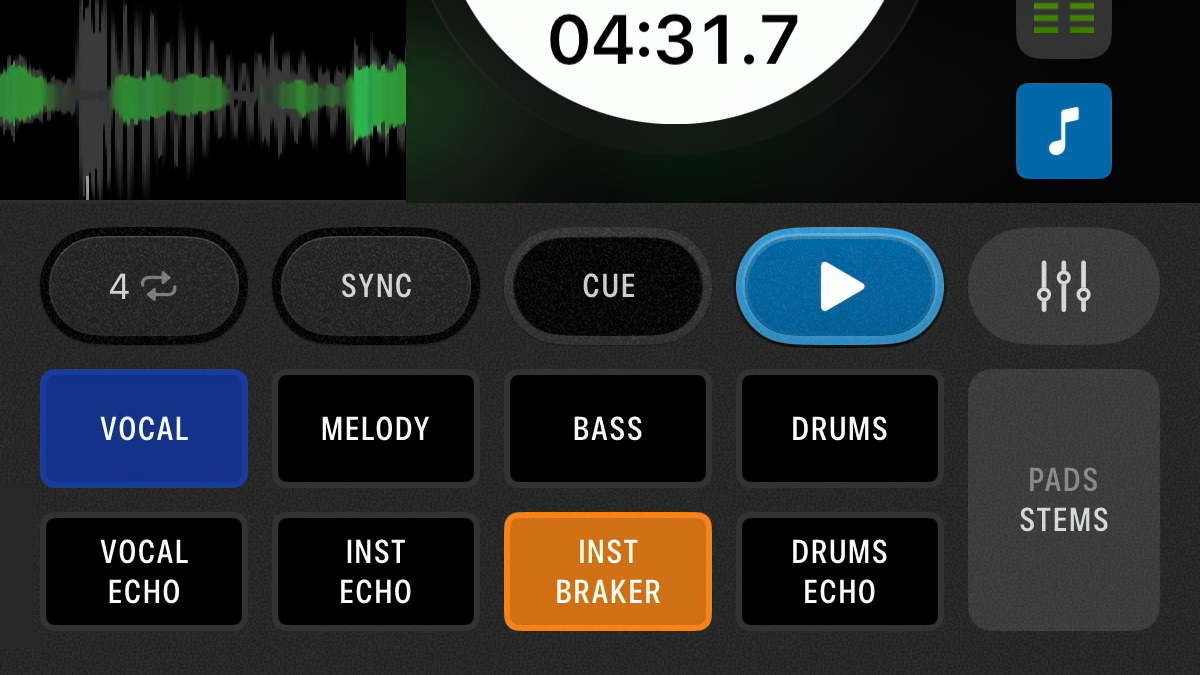
Cue loops, new in 5.0, are here too. Turn them on in the DJ preferences, set a loop, save it to a hot cue, and that pad now jumps and loops in one press. The free version gives you four of them and the paid version eight.
The reviewers found a few gaps on the touch side. You cannot set a manual loop in and out point, only auto loops. The instant acapella and instrumental buttons cut dead, with no echo, which Beatport Tech would like changed. There is no button to kill all the effects at once. And only simple sync is available, which matches the tempos but leaves the phase to you. On the desktop you can choose smart sync, which keeps the grids locked together, and that is exactly what you want when you are mixing with your thumbs.
Crossfader scored the phone on its own a 7 out of 10: fully usable, but djay is still a little more comfortable when you are holding the device in your hands.
Plug in a controller and it becomes something else
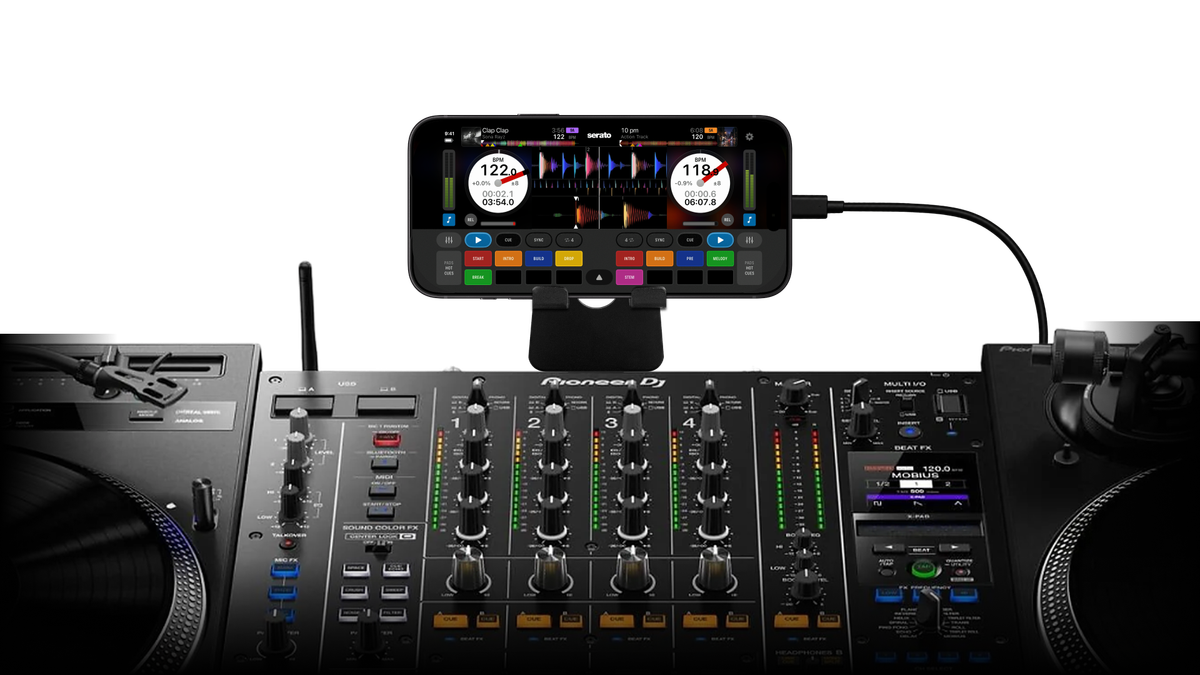
This is where the app makes sense. Plug in a supported controller and Serato spots it and switches into hardware mode with no mapping and no setup. If your iPhone or iPad has USB-C, which means iPhone 15 and newer and most recent iPads, the controller connects directly. Older Lightning devices need Apple's Lightning to USB 3 camera adapter, and Serato's setup guides are worth reading before you buy anything.
Every reviewer tested the Pioneer DJ DDJ-FLX4, the most popular beginner controller on the market, and it is mapped perfectly. The jog wheels, EQs, filters, loops and hot cues all respond, and so do features unique to that controller like Smart Fader and Smart CFX. The browse knob scrolls your library. On the free tier the FLX4 behaves like it does with Serato DJ Lite on a laptop, so the lower row of hot cues and some pad modes flash Upgrade at you. Crossfader gave this setup a 9 out of 10.
The FLX4 has one more trick that matters a lot here: a second USB-C socket that passes power through to your phone. Digital DJ Tips makes the case well. Phone, FLX4, a power lead, speakers and headphones, no laptop at any point, and you have a complete DJ system. Most controllers do not pass power through, and the Reloop Flux is one of the few others that does. If yours is bus-powered and not plugged into the wall, it will drain your phone's battery. For a long set, plan for a powered hub or dock.
Higher up the range it gets better still. On a Rane System One the app drives the unit's screens, stems included. DJ Shubaka, testing on French channel Devenir un bon DJ, found the FLX4's effects buttons worked but the chosen effect did not always show on the phone's screen, and Crossfader noticed the same thing. It is a small annoyance, not a reason to avoid it.
DVS with turntables works properly
Serato's roots are in turntables, and DVS is here at launch in the paid version. Plug the iPad into a Serato-enabled mixer, enable DVS in the advanced settings, check the calibration scopes, and you have absolute and relative mode, anti-drift, loop adjustment with vinyl, needle drop in relative mode and sticker lock. Crossfader called the move from desktop to iOS "flawless and seamless" for an existing DVS user and gave it a 9 out of 10. A-Trak appears in Serato's launch film doing exactly this.
What does not work with it
The hardware list is long, but it is shorter than the desktop's. Serato DJ Pro supports more than 150 pieces of hardware, and the iOS app covers about 120 of them. The reason is that iOS only talks to hardware through Apple's Core Audio and Core MIDI frameworks, so a controller that is not class compliant will not work and no update is going to change that. Some specifics from the reviews:
- CDJs in HID mode are not supported, and Serato says so on its own site. If you play club decks, you will need DVS with control vinyl or timecode CDs.
- Bluetooth connections to controllers are not supported.
- Some hardware works but its screens do not. Beatport Tech found that with the DJM-S11 and the DDJ-REV7.
- Older units like the DDJ-1000 and the Rane Performer are not class compliant, so they are out, according to Cleveland Terry. The DDJ-FLX10 does work.
- Only Serato-certified hardware works. Algoriddim lets you plug in any class-compliant audio interface. Serato does not, which is the same policy it applies on the desktop.
- There is no MIDI remapping. If a controller's stock mapping lacks something, Silent Cue for example, you cannot add it.
Serato also warns that phone calls and notifications can interrupt your set, as with any audio app on a phone. Put the phone in a Focus mode that lets nothing through before you play. Airplane mode works too, but it cuts off streaming.
The library is the weak spot
All three English-language reviews landed on the same complaint. The library inside the app is surprisingly basic, and for DJs who organise carefully it is the biggest limit by far.
- There is no genre column, so you can neither see nor sort by genre.
- There is no rating column, which is odd given ratings were one of the headline features of Serato DJ 4.0.
- There are no smart crates. You cannot build one on the phone and you cannot transfer one from the desktop.
- Only one streaming service can be shown at a time, even though Serato DJ 5.0 on the desktop lets you use several at once.
What you do get works well enough. You can create crates and nest them into folders by dragging, sort by BPM and key, search the current crate, your whole library or the streaming service, analyse tracks, and copy them between crates. There is even a text size setting, which Cleveland Terry cheerfully nicknamed old man mode.
DJ Shubaka's advice is the practical one. Since you cannot browse by genre, build your crates by style, by event and by type of night on the laptop before you transfer them, and the phone becomes much easier to dig through.
Streaming, and its two catches
Apple Music, Beatport, SoundCloud, Spotify and TIDAL are all supported inside the library. If you use streaming, two things change. Recording is unavailable when you are playing streamed tracks, and stems depend on the service. The UK DJ educator who made one of the launch-week settings guides sticks with TIDAL and Beatport for exactly that reason, since they allow stems on streamed tracks.
Streaming in a bar or at a paid event is a separate question from whether the app can do it. We covered the licensing side in is it legal to play Spotify in your bar.
Settings worth changing on day one
The settings mirror the desktop closely. The quick menu at the top holds recording, autoplay, quantize, beatgrid editing, the display mode and waveform zoom. Everything else sits under Advanced Settings. These are the ones worth checking first:
- Replace Pad Mode with Stems. On an FLX4 this swaps the sampler mode for stems on the pads, and it is the first thing one DMC champion turned on.
- Show Beat Jump Controls. Useful on a controller. On touch alone, Beatport Tech preferred to turn it off and keep eight loop pads, since there is a dedicated beat jump mode anyway.
- Analyse Stems. Leave it on with a recent device so stems are ready the moment a track loads. Turn it off on an older iPhone.
- Maintain Sync on Track Load, Play From First Cue Point and Turn Off FX on load all save you from small mistakes mid-set.
- Beatgrid set to Flexible, with BPM changes on beats, to use the new Lucid Beatgrids. Flexible is already the default for new imports.
- Audio latency defaults to 10 milliseconds. You can drop it as low as 1 millisecond on a powerful device, but a scratch DJ who tested both could barely tell the difference.
- Output to iOS Device Speakers, if you want to hear the mix from the phone itself.
- Use Auto Gain, which stays on at the recommended 92 dB. There are no manual gain knobs in the interface, something Beatport Tech would like added.
There is also a light Day Mode in the paid version for playing outdoors in the sun, Camelot, Open Key or classical key notation, EQ-coloured waveforms, and crossfader and upfader curve settings for hardware that has no curve controls of its own.
Serato DJ 5.0 on the desktop
The iOS app arrived with a major desktop update, and it is worth knowing what changed there, since the two now work as a pair.
- Lucid Beatgrids is a rebuilt analysis engine that detects tempo changes and downbeats on its own. Older funk, rock, disco and live-drummed tracks that drift in tempo now get a grid that follows them. There are Flexible and Fixed modes, and existing tracks need re-analysing to benefit.
- Open Streaming lets you stay logged in to several streaming services at once, each shown as its own crate, and mix across them and your own files. BPM and key show for streamed tracks before analysis on Beatport, SoundCloud, TIDAL and Spotify.
- Cue Loops save a loop to a hot cue so one press jumps and loops. On the desktop this is a Serato DJ Pro feature.
- iOS Transfer is the bridge to the new app, in both Pro and Lite.
Lucid Beatgrids and Open Streaming come to both Pro and Lite. The 5.0 public beta opened in September, and the final release landed alongside the iOS app.
What it costs
There are three ways in:
- Free. Four hot cues, four sampler slots, four cue loops and four pad effects, basic stems and effects, sync, key analysis, Pitch 'n Time, horizontal waveforms and iOS Transfer, plus support for entry-level controllers. Think of it as Serato DJ Lite on a phone.
- 149 dollars, once, as an in-app purchase. This unlocks everything on iPhone and iPad: eight pads in every mode, advanced stems with Stems FX, the full effects list, recording, DVS, Day Mode, every waveform view, advanced pad modes, quantize, slip mode, beat jump and pitch play, and every supported controller. There is a seven-day free trial of the paid features.
- Serato DJ Suite at 14.99 dollars a month, or 499 dollars outright. It includes the iOS app along with Serato DJ Pro, all the DJ Pro expansions and Serato Studio. If you already have Suite, just log in on the phone.
Prices are before tax. DJ Shubaka, buying in France, saw the 149 dollar licence come to 178.80 with VAT and the Suite subscription to about 18 dollars a month.
Two things are worth pointing out. A Serato DJ Pro licence on its own, at 11.99 dollars a month or 299 dollars, does not include the iOS app. Only Suite does. And Digital DJ Tips believes that hardware which unlocks Serato DJ Pro on a laptop does not unlock the full iOS app either, though they flagged that they had not fully confirmed it.
The reviewers disagreed on the price. Digital DJ Tips doubts many people will pay 149 dollars outright, and one launch-day App Store review asked who pays 150 dollars to DJ from their phone. Cleveland Terry called it a deal, because nobody else offers a one-off purchase at all. Algoriddim's djay Pro is subscription only, and Beatport Tech agreed that a pay-once option will make a lot of DJs happy.
How it compares
Against Algoriddim djay Pro
djay has had years to refine its iOS app and it shows. It is more customisable, it has more settings, it can build smart playlists, it syncs cue points between devices through iCloud, and it works with any class-compliant audio device. Crossfader found it slightly more comfortable to use with fingers alone. Serato wins on two things: a one-off price, and getting your prepared library from the laptop onto the phone, which on djay still means exporting a OneLibrary drive and importing it again. If you already prepare in Serato, that transfer is the reason to choose it.
Against rekordbox for iOS
Digital DJ Tips thinks rekordbox is closest to solving the real problem, because it has a proper cloud library for your own music and apps for preparing and playing on both laptop and phone. It is also the most frustrating of the three to use and can involve two subscriptions. For rekordbox users the ecosystem still makes sense. For Serato users there is now no reason to cross over.
Against a laptop
This is the comparison that matters most, and the laptop still wins for serious work. A phone screen is small, you need a plan for charging it, you lose your phone while you play, and the library has none of the depth you get on the desktop. Even Serato presents the app as something that works alongside your laptop rather than replacing it. Digital DJ Tips puts it bluntly: until there is a reliable cloud-first library that follows you across devices, phone DJing stays a side option. Their advice to beginners is still to learn on a laptop and build the library there.
Against Serato Pyro
There is no real contest, because they were never trying to do the same job. Pyro mixed for you. Serato DJ for iOS expects you to do the mixing. Autoplay will play through a crate for a cocktail hour or a ceremony, which Cleveland Terry suggests for weddings, but it plays one track after another rather than blending them the way Pyro tried to.
The good
- It feels like Serato. Muscle memory and settings carry over, and existing users will be at home within minutes.
- iOS Transfer is the cleanest way any DJ app currently offers to get a prepared library from a laptop to a phone, with cues, loops and grids intact.
- More than 120 controllers and mixers work on day one, down to controller-specific features like the FLX4's Smart Fader and the System One's screens.
- Full DVS with turntables at launch, with all the advanced vinyl options.
- Stems in real time on the phone, plus cue loops and Lucid Beatgrids from 5.0.
- A free version that is genuinely usable, a one-off 149 dollar licence for people who hate subscriptions, and free access for Suite owners.
- A backup rig in your pocket. Send your four or five most-played crates over and, as Cleveland Terry points out, they will probably fit in 20 or 30 GB.
The catches
- iOS only. No Android, and Serato would not commit to one.
- The library is thin: no genre, no ratings, no smart crates, and one streaming service at a time.
- Transfer is one way, with no cloud sync and no way to send phone edits back to the laptop.
- No CDJ HID mode, no Bluetooth controllers, no MIDI remapping and only Serato-certified hardware.
- Only simple sync, no smart sync. No manual loop in and out on touch. No manual gain.
- Recording is off while streaming, and stems on streamed tracks depend on the service.
- Power and audio routing take some planning on a phone, especially with controllers that do not charge it.
- A Serato DJ Pro licence on its own does not unlock the full app. You need Suite or the 149 dollar purchase.
Who it is for
Serato Suite subscribers and owners first, because it costs them nothing. Put it on your phone, send over the crates you play every weekend, and you have a backup if the laptop dies mid-gig, plus a way to play ceremony or cocktail music without dragging the main rig out.
Beginners with an FLX4 are the second group, and probably the most interesting. A phone and one of the most popular controllers ever made is a complete, cheap, capable DJ setup with no computer anywhere. As DJ Shubaka put it, almost everyone already owns a phone, so the barrier to starting has rarely been lower.
Turntablists who want a lighter bag will also be happy, since DVS works properly on an iPad. And anyone who just wants to mess around can download it, log in to a streaming service and play for free, even into a Bluetooth speaker if they are not bothered about cueing in headphones.
It is not for anyone who needs to build and manage a big collection on the move, anyone who plays on CDJs in HID mode, or anyone hoping to drop the laptop completely. Not yet, anyway.
At a glance
- App: Serato DJ, by Serato Limited, for iPhone and iPad. Released 20 October 2026 as version 5.0.
- Requirements: iOS or iPadOS 18.6 or later. USB-C directly, Lightning through Apple's camera adapter. About 714 MB.
- Price: free with in-app purchases. Full licence 149 dollars once. Included in Serato DJ Suite at 14.99 dollars a month or 499 dollars. Seven-day trial of paid features.
- Hardware: more than 120 controllers, mixers and DVS setups. No CDJ HID mode, no Bluetooth controllers, no custom MIDI mapping.
- Streaming: Apple Music, Beatport, SoundCloud, Spotify, TIDAL. One service at a time.
- Music import: iOS Transfer from Serato DJ Pro or Lite 5.0 over Wi-Fi, AirDrop or cable, plus the Files app and USB drives.
- Free tier: four cues, four samples, four cue loops, four pad effects, basic stems and effects, horizontal waveforms.
- Paid tier: eight of each, Stems FX, full effects, recording, DVS, Day Mode, every waveform view, advanced pad modes.
- Desktop companion: Serato DJ Pro and Lite 5.0, with Lucid Beatgrids, Open Streaming, Cue Loops and iOS Transfer.
Serato's own videos
Frequently asked questions
Is Serato DJ for iOS free?
The app is free to download and the free version is fully usable, roughly at the level of Serato DJ Lite, with four hot cues, basic stems and effects, and support for entry-level controllers. The full version costs 149 dollars once, or comes included with a Serato DJ Suite subscription or licence.
Does Serato DJ Pro include the iOS app?
Not on its own. The iOS app is part of Serato DJ Suite, at 14.99 dollars a month or 499 dollars, which also includes Serato DJ Pro, the expansions and Serato Studio. A standalone Serato DJ Pro licence does not unlock it.
Is Serato DJ available on Android?
No. It is for iPhone and iPad only. Serato has not ruled out Android but has not committed to it either.
Which iPhones and iPads does it run on?
Any iPhone or iPad running iOS or iPadOS 18.6 or later. Devices with USB-C, which means iPhone 15 and newer and most recent iPads, connect to controllers directly. Older Lightning models need Apple's Lightning to USB 3 camera adapter.
How do I move my Serato library to my iPhone?
Update the desktop software to Serato DJ Pro or Lite 5.0, open the iOS Transfer panel, tap Transfer and Files then Transfer on the phone, and drag crates across. It works over Wi-Fi, AirDrop or USB, and cue points, loops and beatgrids come with the files. Smart crates and streaming tracks are not transferred, and changes made on the phone do not sync back.
Does the DDJ-FLX4 work with Serato DJ on iPhone?
Yes, including its Smart Fader and Smart CFX features, and it works with the free version. It can also charge your phone through its second USB-C port while you play.
Can I use DVS and turntables with Serato DJ for iOS?
Yes, with the paid version and a Serato-enabled mixer or interface. You get absolute and relative modes, anti-drift and sticker lock. CDJs in HID mode are not supported.
Can I use Spotify in Serato DJ for iOS?
Yes. Spotify, Apple Music, Beatport, SoundCloud and TIDAL are all supported, but only one service can be active at a time on iOS, and you cannot record your mix while playing streamed tracks.
What happened to Serato Pyro?
Pyro was Serato's earlier iPhone app, launched in 2016, which mixed your playlists automatically. Serato ended support on 7 May 2020 and removed it from the App Store. Serato DJ for iOS replaces it as Serato's mobile app, but it is a full DJ tool rather than an automatic mixer.
The verdict
Serato has ported its desktop software to the phone without losing the feel of it or much of what it can do, and on day one it already supports more hardware than you would expect from a first release. Beatport Tech called it a truly fantastic first version. Every reviewer agreed on the transfer: it is the best way yet to get a prepared library onto an iPhone or iPad.
The library is what holds it back. No genre, no ratings, no smart crates, one streaming service at a time and no way back to the laptop. That last part is a problem for the whole industry, not only Serato, but it means this is a very good second rig rather than your only one. If you own Suite, install it today. If you are starting out with an FLX4, the free version is a fine way to begin. If you were hoping to sell the laptop, wait for the next few updates.
Full details and the hardware list are on the official Serato DJ for iOS page, and the app itself is on the App Store.
One last thought. A DJ setup that fits in a pocket is built for the same world as remote and streamed sets, where you carry less and set up faster. If that is where you play, our lossless streaming setup is worth a look, and the DJing DJ Pool will keep the crates you send to your phone full of fresh music.