
VirtualDJ tracklist export
Paste your VirtualDJ export or drop the file in. Localized headers are fine, and so is the sep=, line Excel adds. The Remix column is read as a mix name, which keeps a remix separate from the original.
How to export from VirtualDJ
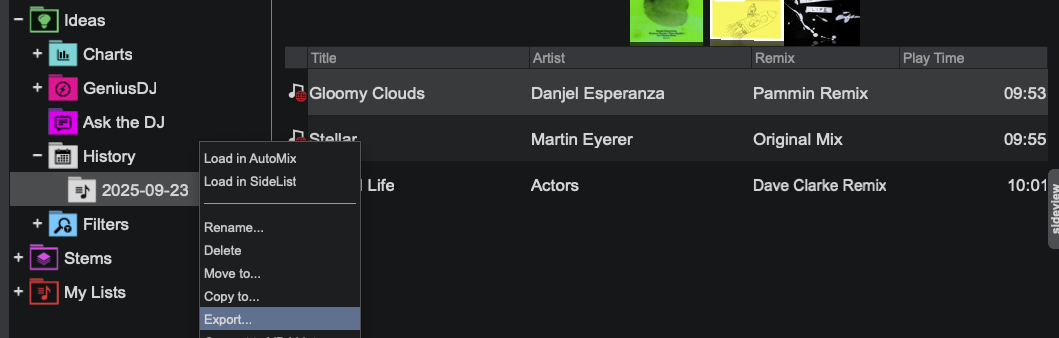
- Open VirtualDJ and go to Ideas → History → Export.
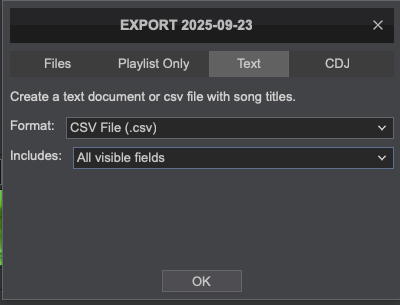
- Pick CSV.
Your tracklist.txt from the History folder works too. Its layout is whatever you configured, so we read it as plain text.
INYour tracklist
OUTMixcloud / DJing format
Your converted tracklist will appear here.
Start times come from the play-time column when it is there, otherwise from track durations.
No export? Send a screenshot
Some sets never produce a file at all. If the tracks are on a screen somewhere, a Mixcloud tracklist, a 1001Tracklists page, your software's history panel, a screenshot is enough.
In your dashboard, under Add prerecorded DJ sets, a screenshot is just another file you can upload: pick the image under Upload file, or set Tracklist to Screenshot to drop several in at once. We read the tracks off them in order, then hand them back for you to check before the set is saved. About 20 rows fit on a screen, so a long set takes a few.
Read a screenshot in your dashboard